
Quick Answer
- Go to dragonkind.com → tap "Let Conscription Day Begin".
- Enter your email → "Send me a code" → check your email for the verification code → enter it.
- The site assigns your Wing, Section and Squad. View them in your Profile.
- Tap "Brave Threshing" and make choices. Dead? Wait 4 hours. Try again.
§1 How to Play Dragonkind Game: Sign Up & Login
Step 1: Open dragonkind.com in your web browser (any modern browser works: Chrome, Safari, Firefox, Edge, etc.).
Step 2: You see a welcome screen that says "Let Conscription Day Begin". Tap it.
Step 3: A form appears: "Welcome, Candidate". Enter your email address.
Step 4: Tap "Send me a code". An email arrives with a verification code (numbers and letters).
Step 5: If the email does not arrive in a minute, check your spam or promotions folder. At launch, the site was overloaded and some emails were delayed. Wait a moment and try sending the code again.
Step 6: Copy the code from the email, return to dragonkind.com and paste it into the code field. Tap confirm.
That's it. No password. No account creation. You are now logged in and inside the Rotunda.
§2 Dragonkind Website Not Working or No Login Code?
Dragonkind launched on October 1, 2026, and the first days were rough. Most login problems come down to the email code or the site being busy. Work through these in order.
The verification code does not arrive
- Check your spam and promotions folders. The code email often lands there.
- Wait a minute or two, then tap "Send me a code" again.
- Check that you typed the address correctly. A typo means the code goes nowhere.
- Players also reported email and code problems at launch. If everything looks right, wait and try again later.
The site is slow or will not load
Heavy traffic at launch caused slow pages and a "Stand by" error from the server. Refresh, wait a few minutes and try again.
The "+alias" email trick
Some players tried addresses like [email protected] to get extra attempts. Players report the site has blocked this workaround. Use your normal address.
Playing on another device
Sign-in is by email code, with no password. On a phone or another computer, open dragonkind.com and sign in with the same email. We have not confirmed how progress carries between devices, so check your Profile after signing in.
After you die
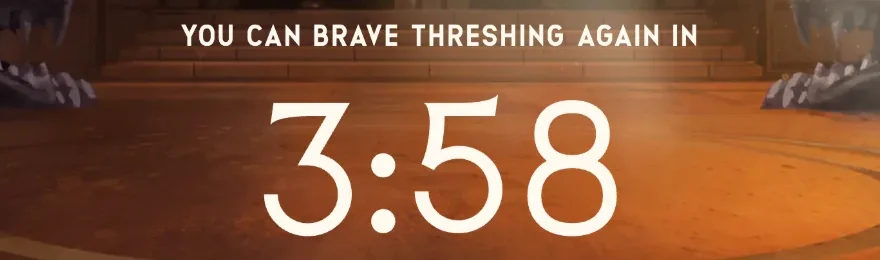
A death locks Threshing for 4 hours, and the Rotunda shows a countdown. There is no known way to skip it. See the Dragonkind retry timer for how the countdown works.
§3 The Rotunda Hub
When you log in, you arrive at the Rotunda, the site's central hub. This is where you rest between Threshing runs and explore the game world.

| Wing | Section | Squad |
|---|---|---|
| First–Fourth | Flame, Claw, Tail | First–Third |
What you see:
- A large central button labeled "Brave Threshing" — tap it to enter the Threshing Valley.
- Left and right arrows on the sides (content varies; explore to find easter eggs).
- A menu bar at the top or side with links to other sections.
- Bottom left: "Artwork" button — view background art and world scenes.
- Bottom right: "Rotunda" button — return here anytime.
- Top right: "Profile" — see your Wing, Section, Squad and any bonded dragon.
- Top right: "Sign out" — log out of your account.
Death Cooldown: If you die in the Threshing, the Rotunda displays a countdown, usually reading "You can brave Threshing again in 3:58" or similar. Wait the full 4 hours before you can enter again.
§5 Enter the Threshing
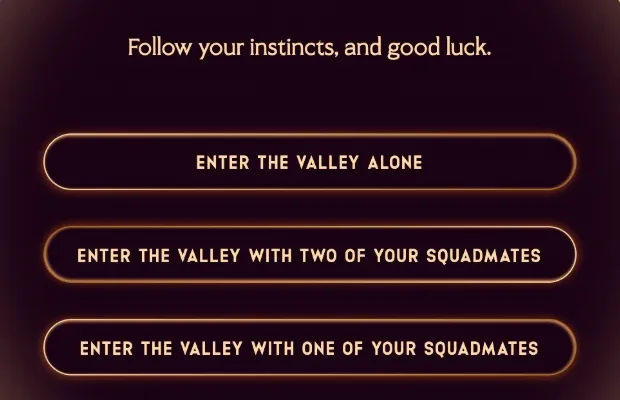
Tap "Brave Threshing" from the Rotunda. You are now in the Threshing Valley, about to survive or perish.
How scenes work:
- Each scene shows a description of what is happening.
- Below the description are two or three buttons, each representing a choice.
- Options often appear one at a time. Wait a moment; a third option may appear after the first two are visible.
- Tap a button to make your choice. This locks you into a new scene.
- Some scenes have only text, followed by a "Continue →" button. Tap it to proceed.
- Most choice scenes show "Next Scene →" after you select.
Survival or death: Some choices lead to survival. Some lead to death. There is usually a story reason—a dragon burns you, you make a mistake in combat, you hesitate too long—but death is quick and sends you back to the Rotunda with a 4-hour cooldown.
If you survive: Eventually you will meet a dragon who chooses you. The scene confirms the bond: you see the dragon's full name, tail type, age, color and lineage. Your Profile is now updated with your dragon.
§6 Survival Tips
The Threshing is designed to be hard. Here are the most useful survival rules:
- Lower your eyes around strange dragons. Early encounters test your respect. Show fear or aggression and you die. Lower your eyes and hold ground.
- Help or ignore the injured cadet carefully. Your choice affects which dragons you later meet. Helping them usually makes greens and browns more likely. Ignoring them makes reds and oranges more likely.
- Climb the tallest tree. This is the key to rare dragons. Only at the tree does the random shadow option appear that leads to blue or black dragons.
- Never hesitate at the two greens. Green dragons despise indecision. Pick one and commit. Hesitation is the most common way players die there.
- Know yourself in the green test. Greens ask about your flaws. Pick a real weakness, not a strength or a denial of weakness.
- Commit to the brown. Browns punish hesitation. Mount the tail and throw your weight—that is the tested path.
- Write down your choices. Many attempts will fail by chance, not by mistake. Keeping notes lets you retry successful paths exactly.
- Do not expect the shadow option every run. The random third option (follow the shadow) only appears sometimes. If it does not appear when you climb the tree, that run cannot reach blue or black. Finish it or reset for another try.
For much more detailed guidance, see our Threshing route map with every scene and choice spelled out.
§ FAQ
Do I need a password to play Dragonkind?
No. Dragonkind uses email verification codes instead of passwords. Enter your email, receive a code, enter the code, and you are logged in.
I didn't receive my verification code email.
Check your spam folder first. If the code still does not arrive, wait a minute and try "Send me a code" again. At launch, the site was overloaded and some emails were delayed.
What does "Stand by" mean?
"Stand by" is an error message from the server, not a game event. It usually means the site is experiencing heavy traffic or a temporary outage. Refresh the page and try again.
Can I choose my Wing, Section and Squad?
No. Your Wing, Section and Squad are assigned when you register. You can view them in your Profile but cannot change them.
What happens to my dragon if I am inactive?
There is no information yet about account inactivity or dragon loss. As of October 2026, the site is brand new and such policies have not been announced.